Lutri
Menu
Coming soon

Private photo search for iPhone and Android

Search your photos the way you remember them.

Find photos by describing them. Search text in screenshots and words spoken in videos. Your media and searches stay on your phone.

Coming soon to iPhone and Android. Free to start.

  • No account needed
  • Photos stay on your phone
  • Search offline after setup
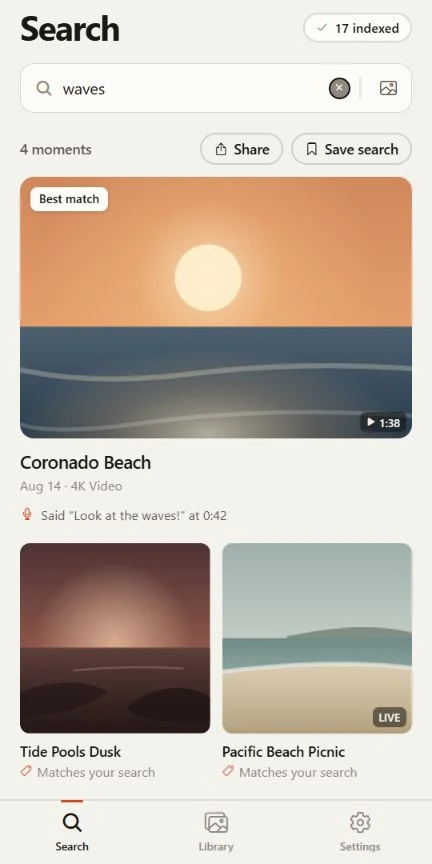
Lutri searching for waves in the sample library, with a spoken quote at 0:42 in Coronado Beach.

Real app screens. Built-in sample library.

What it finds

Search photos, videos and spoken words.

A birthday cake. A word on a receipt. Something said in a video. Start with the detail you remember, then open the matching photo or moment.

Captured in Lutri with sample content. Tap a screen to see it in full.

01

Find photos by description

“birthday candles”

Photo search in Lutri showing the sample Birthday table resultView full screenshot

Describe a scene, object or detail in everyday words. You can also choose a photo to find visually similar pictures in your library.

Scene and similarity search need the optional visual-model download. File-name search works as your media is indexed.

02

Search videos and voice memos

“waves”

Spoken-word search in Lutri showing a quote from the sample Coronado Beach videoView full screenshot

Search what was said in videos and optional Android voice memos, or find a visual scene inside a video. Speech is transcribed on your phone, up to the first 90 seconds per file.

The speech model is bundled. Visual scene search needs the optional download; spoken excerpts are included with Full Access.

03

Find text in screenshots

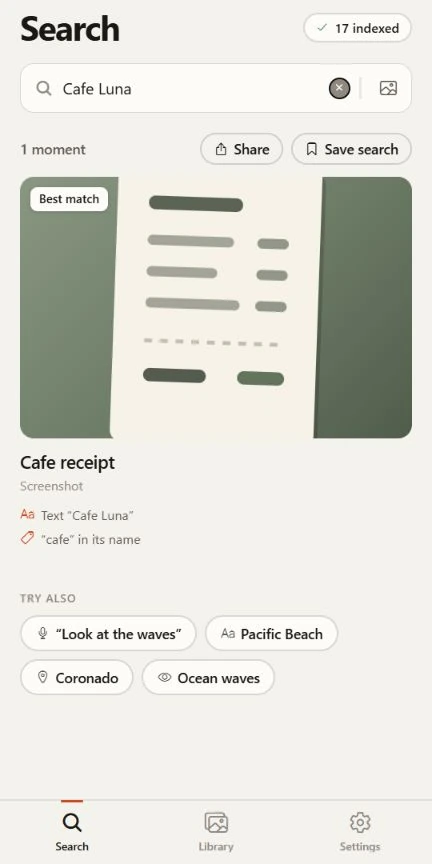
“Cafe Luna”

Text search in Lutri finding Cafe Luna on a sample receiptView full screenshot

Search words on receipts, signs, menus, whiteboards and screenshots. Lutri reads text in your pictures on the phone, so you can find it again without remembering the file name.

No visual-model download needed. Available as your media is indexed.

04

Collections that build themselves

Lutri Library showing sample collections and indexed mediaView full screenshot

Receipts, tickets, documents, screenshots, and duplicates gather in your Library without you filing anything.

Works right away, before the model download.

How it works

Set it up once. Then just search.

  1. Choose what it can see.

    Allow your whole library, or only the photos you pick. Lutri reads them where they are and never copies, moves or changes one.

  2. Make your library searchable.

    Lutri indexes file names, dates, text and spoken words on your phone. Download the optional 388 MB visual model to add scene and object search. A large library can take time; indexing runs in batches, by default while charging. Adjust the schedule in Settings.

  3. Describe what you remember.

    Results appear as you type, from a private index kept on the phone. Open one, share it, or save the search so new matches gather on their own.

Built to stay private

Your photos stay on your phone.

Lutri analyzes your photos, videos and audio on your phone’s processor. Your media, transcripts and searches are not uploaded for analysis.

What leaves your phone
WhatDoes it leave?What actually happens
Your photos, videos and audioNeverLutri reads them where they are. Audio and its transcribed words stay on the phone too.
What you search forNeverSearches are matched on the phone. There is no server to send them to.
The search indexNeverIt is a private file inside the app, kept out of iCloud and Google backups.
PurchasesVia the storeThe App Store or Google Play takes payment. RevenueCat loads plan options and confirms the plan. It receives a random install ID, the purchase receipt and standard technical details such as an IP address, never your photos.
The search modelDownloaded onceOne file of about 388 MB comes from Hugging Face. It is checked against a fixed checksum before it is used.
  • No account required. Use Lutri for free or buy through your mobile store. Optional sign-in shares purchases across supported devices, never your photos.
  • No ads or cross-app tracking. Your media and searches stay private. Purchase services receive the billing information described in the Privacy Policy.
  • Test it yourself. Switch on airplane mode and search. It still works.

Pricing

Start free. Buy it once, or subscribe.

The free version has no time limit. Index up to 150 media items, including optional Android voice memos, and see the top 25 search results. Upgrade when you want the whole library.

Yearly

$19.99per year

$1.67 a month.

Monthly

$2.99per month

Month to month. Cancel any time.

A subscription renews at the price shown until you cancel in your store settings. Lifetime is a single payment with no renewal; the Terms of Use explain what it covers. Prices are in US dollars; your store shows the price in your own currency.

Free and full, side by side

Both search on the phone, including spoken words. Full Access lifts the two limits and adds spoken excerpts, saved searches and priority indexing for new screenshots.

Free and full version, side by side
FeatureFreeFull version
Search by what is in a pictureIncludedIncluded
Search the text in photosIncludedIncluded
Collections that build themselvesIncludedIncluded
Instant demo with sample photosIncludedIncluded
Media items indexed150Unlimited
Results shown per searchTop 25Every result
Search spoken wordsIncludedIncluded
Spoken excerptsNot includedIncluded
Saved searchesNot includedIncluded
Priority indexing for new screenshotsNot includedIncluded

Questions

Straight answers.

Something not here? The support page has how-tos and ways to reach us.

Can I search what was said in a video or voice memo?

Yes. Lutri transcribes spoken words on your phone using its bundled speech model, with no microphone recording or extra speech-model download. Speech indexing currently reads up to the first 90 seconds of each file. On Android, turn on Include voice memos in Settings to include audio files. Speech search works on the free plan within its limits; Full Access also shows spoken excerpts. Recognition can miss or mishear words.

Help with spoken-word search
Does Lutri upload my photos?

No. Your photos, videos, audio, transcripts and searches stay on your phone. Store and purchase services receive billing and technical information to load, buy, confirm or restore a plan. The optional visual model is downloaded separately. Optional usage analytics runs only if you enable it in Settings and never includes media or searches. The Privacy Policy explains the data involved.

Read the Privacy Policy
Does it work without internet?

Yes. After your media is indexed, text, file-name and spoken-word searches work offline. The speech model is bundled with the app. Scene and object search also work offline after the optional visual model download. A connection is needed to download that model, and to buy, restore or re-check a plan.

What is the model download?

The optional 388 MB visual model adds scene, object and visually similar photo search. It is downloaded once from Hugging Face and checked before use. File names, dates, text and spoken-word searches work without it as your media is indexed. Tap Download on Search, Indexing or in Settings; Wi-Fi is recommended.

Set up visual search
Which phones does it work on?

iPhones with iOS 18 or later, and Android phones with Android 14 or later.

How many photos can it handle?

The free version indexes up to 150 media items, including photos, videos and optional Android voice memos, and shows the top 25 results per search. Full Access removes those two limits. Indexing time and storage use depend on your phone and library; progress and scheduling controls are in Settings.

Manage indexing and progress
Will it change, move or delete my photos?

No. Lutri only reads your library. It never edits, moves or deletes anything. Clearing the search index in Settings removes Lutri’s own index and previews, and your photos stay where they are.

Can I try it before I pay?

Yes. Once Lutri is available, the free plan lets you index up to 150 media items and see the top 25 results per search, with no time limit. The built-in sample tour also lets you explore search, spoken excerpts and saved searches before giving access to your own library.

What does Lifetime mean?

One payment of $24.99 and no renewal. It unlocks Full Access for as long as the relevant Lutri product is offered on a supported platform. Use the original store account to restore, or link the purchase to your optional Lutri purchase account and sign in on supported devices. Separately sold products are not included. Windows support is not yet available and no release date is promised. The Terms of Use explain what Lifetime covers.

Restore a purchase
What are its limits?

Results, text recognition, and collections are approximate, so it can miss a photo, misread a receipt total, or rank one badly. It cannot tell people apart across photos. We state these limits upfront so you know what to expect.

Find the moment you were thinking of.

Free to start. No account needed. Your photos stay on your phone.

Coming soon to iPhone and Android.